

Instead of sending wine-gift links to guests individually, add wine gifts to your wedding registry through Zola or The Knot’s external-gift tools, after checking their current alcohol rules. This 2026 guide shows you how to choose a gift from Buywinesonline, create a clear registry entry, and test what your guests actually see.
- To add wine gifts to wedding registry pages, check Zola or The Knot’s alcohol rules before importing products.
- Buywinesonline is best for home wine consumers choosing bottles and tasting sets as wedding gifts.
- External wine gifts need clear purchase instructions; a registry listing does not establish shipping eligibility.
- Test the guest view and purchase tracking before sharing your wine registry.
Why this matters
Adding a wine gift and arranging its delivery are separate tasks. Your registry organizes the request. The retailer handles the actual wine purchase, subject to its shipping requirements and applicable alcohol laws.
That distinction matters when guests shop outside your registry platform. A product link alone does not explain where to send the wine, whether a purchase updates your registry, or who will receive the shipment.
Buywinesonline sells over 5,000 wines, gift sets, and curated tasting selections for home wine consumers and gift shoppers. That gives you choices, but your registry needs a short, deliberate selection—not a catalog for guests to sort through.
For a 2026 wedding, build each wine entry around a specific use: a newlywed dinner, a tasting night, or an anniversary toast. Guests should understand the gift without needing to know wine terminology.
Before you start
- Registry access: Have access to your Zola or The Knot account and its current external-gift instructions. Check whether alcohol products are permitted and which listing methods your account supports before importing a bottle.
- Gift details: Keep the exact retailer product page, product name, bottle size, desired quantity, and preferred receiving address ready. For a tasting set, record the selected version rather than just the general set name.
- Delivery and tracking checks: Confirm the retailer’s current shipping rules for your destination and its receiving requirements. The non-obvious gotcha: a guest buying from an external retailer does not necessarily update your registry automatically.
In the US, alcohol purchase is restricted to adults aged 21 and older. Do not use a registry entry to bypass age verification, destination restrictions, or delivery requirements.
Confirm eligibility before writing the gift description. If your platform excludes an alcohol item or your destination cannot receive it, a polished entry still will not produce a workable gift.
Wine-gift selection
Choose the gift before configuring either registry. An exact bottle works well when you already know what you enjoy; a tasting set suits couples who want to explore several wines together.
The options below serve different purposes. Neither choice replaces the shipping and platform checks above.
| Wine gift | Best for | Advantage | Limitation | Registry detail to include |
|---|---|---|---|---|
| 15 Bottle Fall Wine Tasting Set — All Red, All White, or Mixed | Couples planning tasting nights at home | Offers all-red, all-white, or mixed red-and-white selections | Requires room for 15 bottles; the guest needs your chosen version | Set preference and quantity of complete sets |
| Silver Oak Alexander Valley Cabernet Sauvignon With Gold Gift Wine Box | Couples who want Cabernet Sauvignon in gift packaging | Includes 1 bottle and 1 gold gift wine box | Centers the gift on one wine style rather than a broader tasting selection | Exact product name and quantity of gift sets |
Choose the 15 Bottle Fall Wine Tasting Set for variety; choose Silver Oak Alexander Valley Cabernet Sauvignon With Gold Gift Wine Box for a focused Cabernet gift. Match the request to how you actually drink wine, not how impressive the entry sounds.
The tasting set contains 750 ml bottles. Write its registry quantity as a quantity of complete sets, not individual bottles, so a guest does not confuse the set’s contents with the number of gifts requested.


Zola external-gift setup
Import the exact gift
- Sign in to Zola and open your registry-management area. Read Zola’s current instructions for adding gifts from other stores, including any restrictions relevant to alcohol.
- Open the exact retailer product page in a separate browser tab. Select the intended version first, such as the mixed tasting set rather than the all-red version.
- Use Zola’s supported external-gift method. If you have installed its browser tool, use Add to Zola from the product page; follow the current account instructions for any other supported method.
- Review the imported product name, image, destination link, and quantity before saving. Correct any details that describe a different bottle or set.
Expected result: The registry editor contains the intended wine gift and points to the correct retailer page. An imported entry is not yet proof that the guest purchase path works.
Define the purchase route
- Review the purchase method offered for that external gift. Distinguish a guest buying the actual product from a contribution that you later use to purchase it.
- Choose the supported method that matches your intent. Do not describe a contribution as a shipped bottle.
- Add a short purpose statement, such as a request for a newlywed tasting night. Keep delivery instructions separate from the reason you want the gift.
- Save the entry, then check the guest-facing version before publishing your registry widely.
Expected result: Guests can tell whether they are purchasing wine or contributing toward a future purchase. For your 2026 registry, use that same distinction consistently across every external wine entry.
The Knot external-gift setup
Add the retailer item
- Sign in to The Knot and open your registry-management area. Check its current external-gift instructions and alcohol restrictions before adding a product.
- Open the exact wine or gift-set page you selected. Avoid importing a retailer homepage or a broad category when you want a specific item.
- Use The Knot’s supported method for adding an item from another store. Follow the current account instructions rather than assuming Zola’s browser tool or workflow applies.
- Review the resulting entry. Confirm that the title, image, link, and desired quantity all refer to the same gift.
Expected result: Your registry contains a specific external item, not a general request that leaves guests guessing which wine to buy.
Make the request understandable
- State the selected version in the description if the product offers choices. For the tasting set, identify all red, all white, or mixed red and white.
- Explain the occasion in plain language. A tasting night or anniversary dinner is clearer than a vague request to build a collection.
- Check how the external gift is recorded as purchased. Follow The Knot’s current instructions for purchase status rather than assuming retailer checkout handles it.
- Preview the saved entry from the guest side and follow its link to the retailer.
Expected result: A guest can identify the requested gift and understand the next action without contacting you. Keep the entry focused on the item; do not paste a long product description into the registry.
Guest-view verification
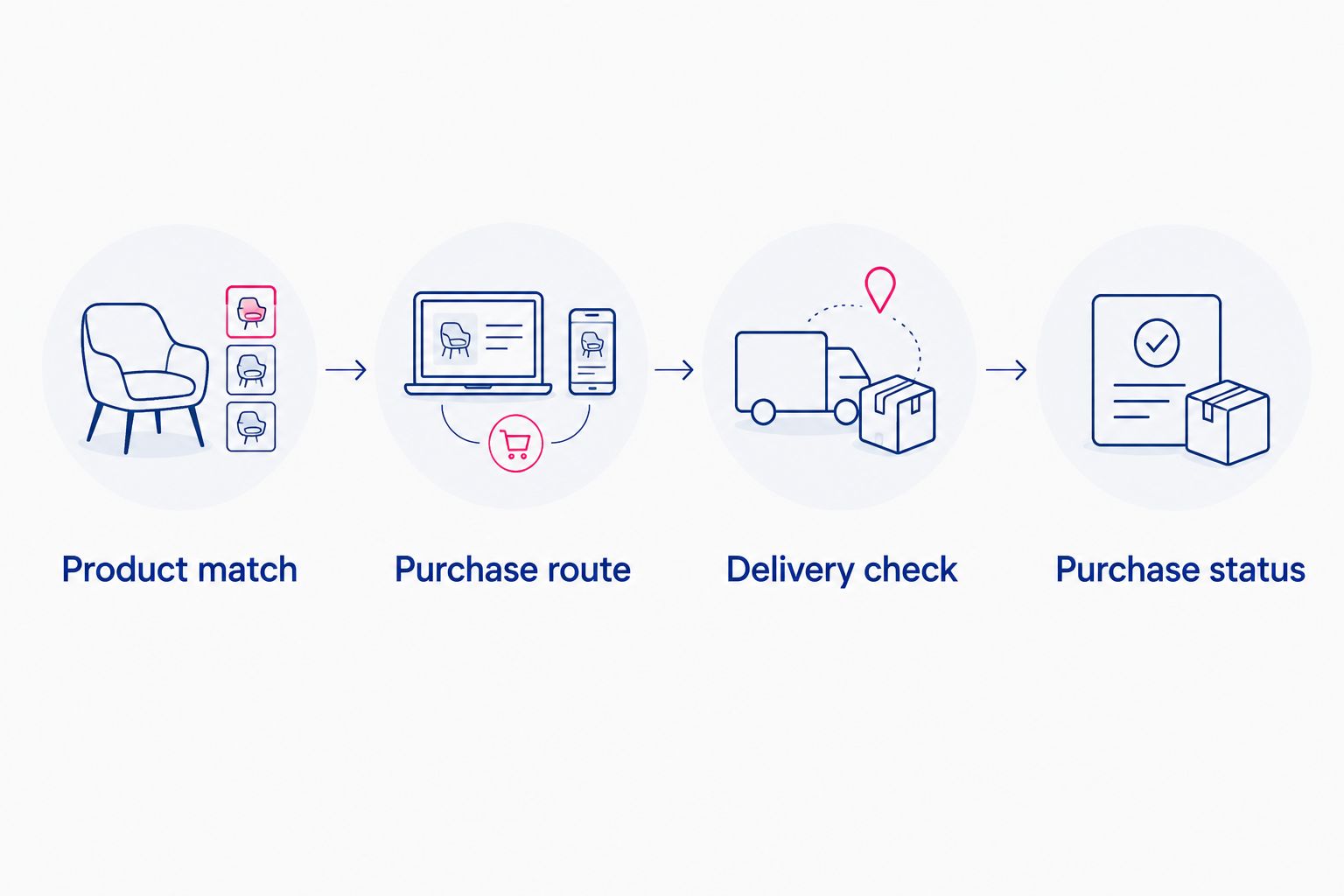
Test the entire route, not just the saved entry. Use a signed-out browser window to check the registry as a guest, without completing a purchase.
- Product match: Open the public-facing registry and locate the wine gift. Compare its name and image with the retailer page.
- Purchase route: Follow the gift’s purchase action. Check whether it opens the retailer product or a contribution flow.
- Delivery check: Read the retailer’s current destination and receiving requirements. Make sure the address you intend to use is appropriate.
- Purchase status: Find the registry’s instructions for recording an external purchase. Confirm what the guest must do after checkout.
Expected result: You have a clear path from the registry entry to the intended gift, with no unexplained handoff. Repeat this check after editing the product link, gift version, or receiving plan.
A useful registry description answers three questions: what you want, which version you want, and why you want it. Add purchase or receiving instructions only where they clarify the external checkout process.
Keep private address details out of publicly visible descriptions. Use the platform’s supported address controls or an appropriate private communication channel instead.
Second workflow: a wine-themed contribution
A wine-themed contribution is an alternative when your registry supports an appropriate fund and its terms allow your intended use. It is not a workaround for an alcohol restriction, and it does not arrange a wine shipment.
Best for: Couples who want to choose their wines later or avoid asking guests to select an exact product. The advantage is flexibility; the limitation is that you handle the eventual wine purchase yourself.
| Workflow | Best for | What the guest gives | Main advantage | Main limitation |
|---|---|---|---|---|
| External wine item | Couples with an exact bottle or set in mind | The requested retailer product | Makes the gift specific | Requires coordination of delivery and purchase status |
| Wine-themed contribution | Couples who want to choose later | A contribution through a supported fund | Separates guest gifting from wine selection | Does not purchase or ship wine for you |
- Check the platform’s current fund options and terms before creating the entry.
- Give the fund a clear purpose, such as newlywed wine tastings, rather than implying that a particular bottle has already been ordered.
- Explain that you will choose and purchase the wine yourselves.
- Preview the guest-facing contribution route and confirm its wording matches that purpose.
For a 2026 registry, decide whether you want exact products or flexible contributions before creating overlapping entries. If both support the same tasting night, explain the difference so guests do not mistake them for separate needs.
Do not promise an automatic connection between registry contributions and Buywinesonline orders. Treat the later retailer purchase as a separate transaction.
Troubleshooting
The imported item shows the wrong version
Return to the retailer page and select the intended version. Then correct or recreate the registry entry using the platform’s supported method, and confirm that the guest-facing description names your choice.
A matching image is not enough. Your tasting-set preference must remain understandable even if the retailer page opens with a different default selection.
The external-gift tool does not capture the product
Use the platform’s current help instructions for its supported browser or manual-entry method. Copy the exact product page rather than a search result, shopping cart, or temporary session link.
Do not substitute an unsupported method simply to get an entry onto the page. If alcohol is excluded, stop the import and choose a permitted registry approach.
The guest link opens the wrong page
Edit the registry link to point to the intended product. Test it again in a signed-out window, then compare the product title and bottle size with your request.
A retailer homepage is useful for browsing but weak for an exact gift. Guests should not need to reconstruct your selection from a general store link.
A purchased gift still appears unpurchased
Check the platform’s external-purchase reporting instructions. Ask the guest to follow the supported reporting process, or use the registry’s owner controls where available.
Keep the guest’s order confirmation for your own records. Do not publish order numbers or personal delivery details in the gift description.
The intended delivery address does not work
Check the retailer’s current destination rules before asking the guest to order. Use another receiving arrangement only after confirming that it meets the applicable requirements.
Do not assume a wedding venue accepts personal alcohol shipments. Confirm receiving arrangements directly, and keep registry gifts separate from any venue-managed event wine.
Customize your workflow
Use Buywinesonline wedding gifts to plan wine you will enjoy after the celebration, rather than turning your registry into an event-supply order. Choose a focused Cabernet gift, a tasting selection, or another wine style that matches your household.
Keep a private record of the registry entry, selected product version, purchase status, and receiving plan. That record helps you reconcile external purchases without putting personal information on a public page.
For a 2026 wedding, review wine entries whenever your address or travel plans change. A clear registry description cannot fix a receiving plan that no longer fits your schedule.
Keep the process small enough to maintain. A few intentional wine requests are easier to verify than a long list of near-identical bottles.
FAQ
How do I add wine gifts to my wedding registry?
Check your registry platform’s alcohol rules, then use its supported external-gift method to add the exact retailer product. Review the selected version, purchase route, delivery requirements, and purchase-status instructions before sharing the entry.
Can I add Buywinesonline gifts to Zola?
Check Zola’s current alcohol and external-gift rules before adding a Buywinesonline product. Where the item is permitted, use the supported external-gift workflow and test the saved entry from the guest view.
Can I put wine gifts on The Knot registry?
Use The Knot’s current alcohol rules to determine whether your intended wine gift is permitted. If it is, follow the supported external-item process and confirm how guests record purchases made at the retailer.
Is a wine tasting set better than a single bottle for a wedding gift?
A tasting set is better for couples who want variety; a single bottle is better for couples requesting a specific wine. Consider storage space and make the desired set version clear.
Will buying wine from an external retailer automatically mark it purchased?
Do not assume an external retailer purchase automatically updates your registry. Check the platform’s purchase-reporting instructions and tell guests what action is required.
Can guests send registry wine directly to our home?
Direct delivery depends on the retailer’s current shipping rules, the destination, and receiving requirements. Confirm those details before asking a guest to place an order.
Should I register for wine or create a wine fund?
Register for an exact wine item when you want a specific gift; use a permitted fund when you want to choose later. A contribution does not purchase or ship wine, so you handle the later retailer transaction.
One last thing
Treat an anniversary date as a reason for the gift, not proof that a wine should be stored until then. If you request a bottle for a future celebration, check wine-specific storage and drinking guidance before setting it aside.
The simplest final test is practical: can someone unfamiliar with wine identify the gift, complete the correct purchase route, and understand how it reaches you? If not, fix the entry before sharing your registry.